

How to Find the Firmware and Baseband Version of Your iPhone
hese are instructions on how to find the firmware and baseband version (modem firmware) your iPhone is currently running.
Step One
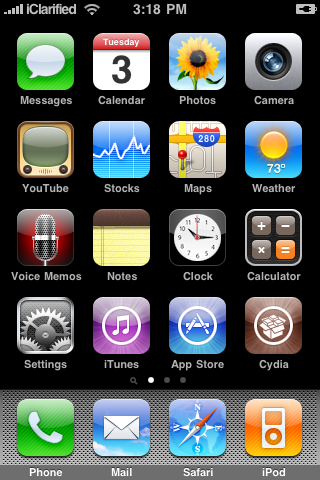
Press to launch Settings from your Springboard.

Step Two
Press to select General from the Settings Menu.

Step Three
Press to select About from the General Settings Menu.

Step Four
From the about screen you can find your firmware version under the Version label.

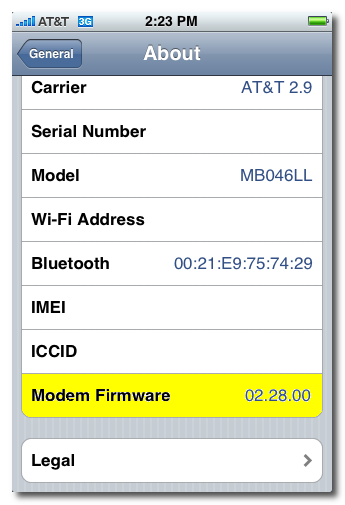
Scroll down and you can find your baseband version under the Modem Firmware label.

Step One
Press to launch Settings from your Springboard.
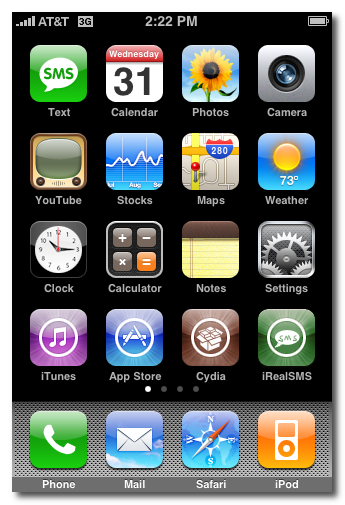
Step Two
Press to select General from the Settings Menu.
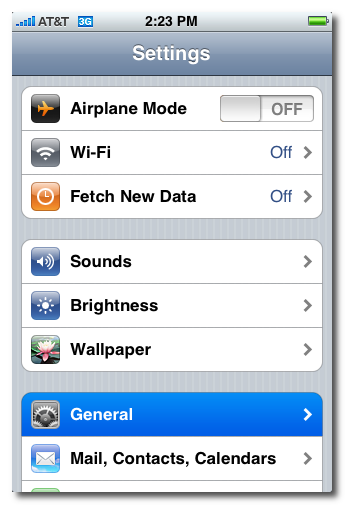
Step Three
Press to select About from the General Settings Menu.
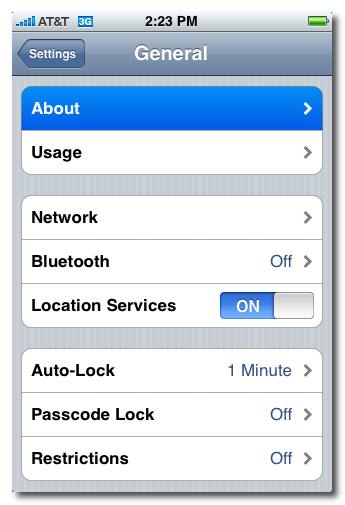
Step Four
From the about screen you can find your firmware version under the Version label.
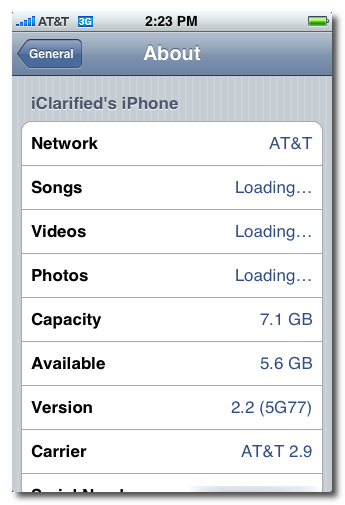
Scroll down and you can find your baseband version under the Modem Firmware label.
How to Unlock the iPhone 3G, 3GS Using BlackSn0w
These
are instructions on how to unlock the iPhone 3G and 3GS using
BlackSn0w. To follow these instructions you must be on the 05.11.07
baseband and have already jailbroken.
If you have not already jailbroken it will be easier to follow one of these tutorials which will walk you through both jailbreaking and unlocking.
- Windows
- Mac
To check your baseband you can follow these instructions.
Lets begin...
 Watch the Video!
For your convenience this tutorial is available in video format also. Click the Watch It button to view the tutorial!
Step One
Press to launch Cydia from your iPhone Springboard.

Step Two
Press to select Manage from the tabs at the bottom of the screen.

Step Three
Press the large Sources button.

Step Four
Press the Edit button at the top right of the screen.

Step Five
Press the Add button at the top left of the screen.

Step Six
Input http://www.blackra1n.com as the source address then press the Add Source button. Once Cydia has added the source press the large Return to Cydia button.


Step Seven
Press the Done button at the top right of the screen.

Step Eight
Press to select blackra1n.com from the list of sources.

Step Nine
Press to select blacksn0w from the list of packages.

Step Ten
Press the Install button at the top right of the screen.

Step Eleven
Press the Confirm button at the top right to begin installation.

Step Twelve
Once the unlock has been installed successfully press the large Return to Cydia button.

Step Thirteen
Wait a few minutes for your CommCenter to restart and you will now be able to use the SIM card of your choice on your unlocked iPhone!

If you have not already jailbroken it will be easier to follow one of these tutorials which will walk you through both jailbreaking and unlocking.
- Windows
- Mac
To check your baseband you can follow these instructions.
Lets begin...
Watch the Video!For your convenience this tutorial is available in video format also. Click the Watch It button to view the tutorial!
Step One
Press to launch Cydia from your iPhone Springboard.
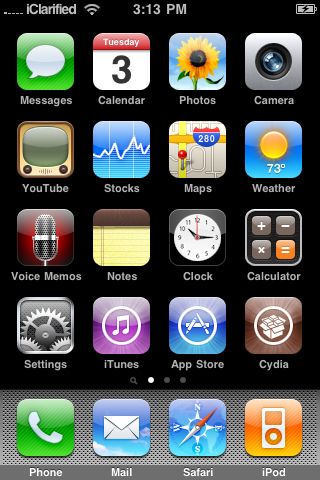
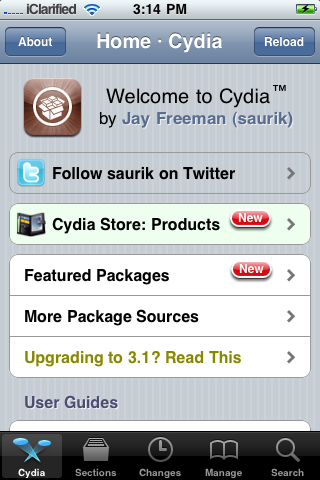
Step Two
Press to select Manage from the tabs at the bottom of the screen.
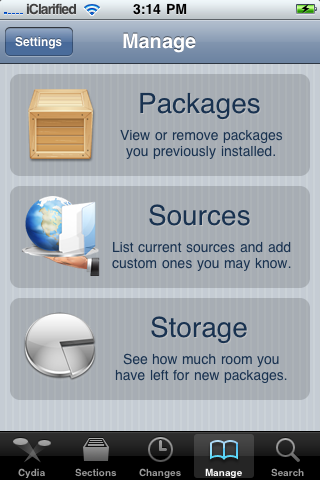
Step Three
Press the large Sources button.
Step Four
Press the Edit button at the top right of the screen.
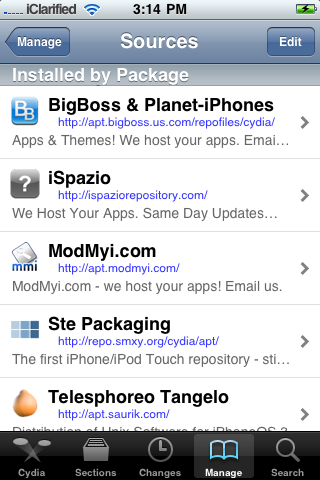
Step Five
Press the Add button at the top left of the screen.
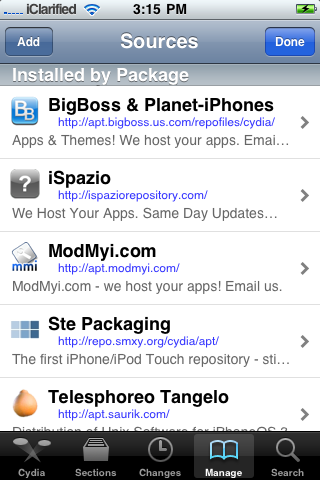
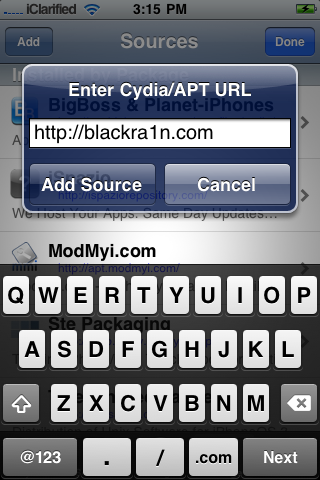
Step Six
Input http://www.blackra1n.com as the source address then press the Add Source button. Once Cydia has added the source press the large Return to Cydia button.
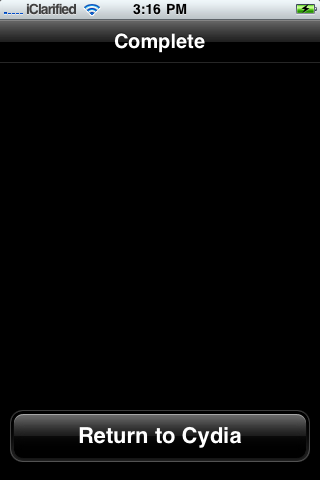
Step Seven
Press the Done button at the top right of the screen.

Step Eight
Press to select blackra1n.com from the list of sources.
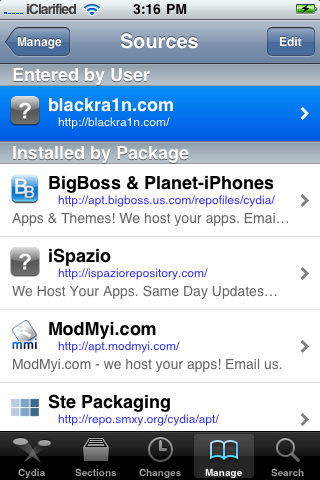
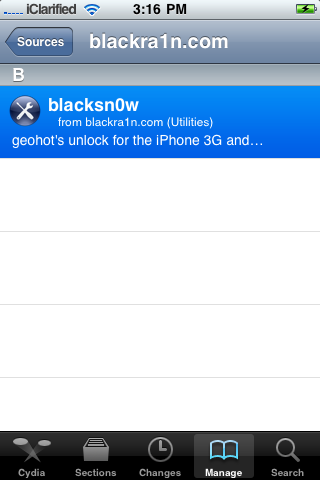
Step Nine
Press to select blacksn0w from the list of packages.
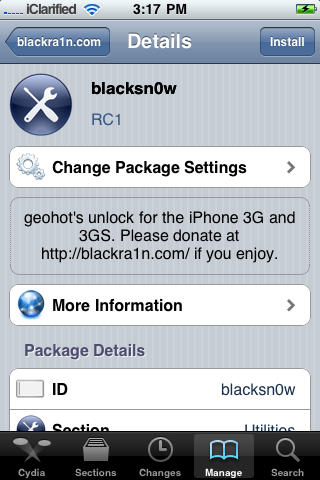
Step Ten
Press the Install button at the top right of the screen.
Step Eleven
Press the Confirm button at the top right to begin installation.

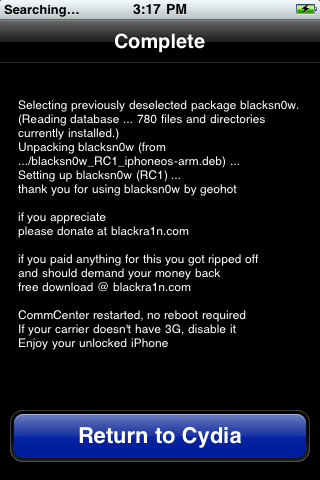
Step Twelve
Once the unlock has been installed successfully press the large Return to Cydia button.
Step Thirteen
Wait a few minutes for your CommCenter to restart and you will now be able to use the SIM card of your choice on your unlocked iPhone!
How To Unblock Or hack Cyberoam To Access The Blocked Sites

WHAT IS CYBEROAM ??
| Cyberoam’s all-inclusive UTM solution offers a well-coordinated defense through tightly integrated best-of-breed security solutions over a single interface -Stateful inspection firewall, VPN, gateway anti-virus, gateway anti-spam, gateway anti-malware, intrusion prevention system (IPS), content filtering, bandwidth management (QoS), multiple link management and enhanced user-based reporting. |
| That means it maintains records "Who is Doing What" ? |
First of all I will inform you all that cyberoam is highly secured internet client and it blocks all the types of proxies like http,CGI, socks(4/5), Ftp, highanonimity ...In short All..
As you all know that every Programmer leaves aleast a One Loop Hole in its Programming or software Design . Why I am saying this is beacause Cyberoam has also left this Loop Hole in its Design .. Now what is this loop Hole ??
Its HTTPS Loop HOLE...
HOW HTTPS WILL GOING TO UNBLOCK SITES ??
Https are SSL secured http clients ... and these are most secured Sites on the Network , that's why cyberoam Leaves it ..
Now the Main Point To access the Blocked sites you have to use the Https based Proxies.
Most of Https based Proxies are Paid so to search on Net for free Https Based Proxies is a Waste of Time...
I am Providing You the One Such Free Proxy service to access blocked Sites On the Cyberoam.
So feel free to surf anysite in your college ... the Best thing is that This site will not allow cyberoam Admin to track You ..
Click on the above Link and surf Freely any site in your
college...You need to accept the certificate provided by the Site to Use
It... As your web web browser show the Certificate accept statement at
the First time you visit the Https Site.
How to make your own 100% FUD crypter with C++
Thanks To
This
tutorial is strictly for educational purposes only, I am not
responsible for any of the action you may take upon others. Please,
Don't abuse this tutorial, Use it wisely.
I'm not going to explain a completely new method of how executables can be made FUD. I guess most of the public available crypters do it similarly. But the problem with those crypters is that they get detected very soon after they were published. So I figured out a way to write my own crypter in C++. In this tutorial I'm going to explain how you can implement your own crypter and how you can play around with the code to get your exe FUD again if it gets detected some day.
Maybe these ideas are not new to you and someone else posted them already here somewhere. In this case please let me know.
I tested it with two RATs:
- Poison Ivy server (v2.3.2)
- Cybergate server (v1.07.5) (Hint: "Compress with UPX" must be disabled)
(other tools might also work with this technique, just test with your exe)
The system is a Windows XP SP3 machine. I don't know if this also works for Vista and 7. Maybe someone can try?
Server size:
- Poison Ivy: 10KB (before), 46KB (after)
- Cybergate: 290KB (before), 327KB (after)
Antivirus (AV) detection:
!!Important!! If you want to test your crypted exe with online AVs, do it only here (http://scanner2.novirusthanks.org/) and don't forget to check the checkbox "Do not distribute the sample"! Otherwise your exe will be distributed to the AV companies so they can exermine it and update their virus databases.
So let's get started!
Agenda:
1. Stuff you need
2. Implement the Encrypter
3. Implement the Stub (Decrypter)
4. Bind your encrypted exe with the Stub
5. Play around with code to get your exe to be FUD again
1. Stuff you need
- Microsoft Visual C++ Express 2010: http://www.microsoft.com/express/Downloads (the Express edition it is free)
- Resource Hacker: http://www.angusj.com/resourcehacker
- my implementations of the Encrypter and the Stub (Visual Studio projects): http://www.mediafire.com/?uvst74qimxjvoi1
2. Implement the Encrypter
Open the Visual Studio project "MyEncrypter" by double clicking on "MyEncrypter.sln" (see "1. Stuff you need" for a download link). It should look like this (sorry, I have the german version of Visual Studio):
(for all of you C++ pros out there: I know my code can be optimized. I'm not used to C++ coding, so please be lenient... this is for educational purpose, not for max performance)
The Encrypter is a console application. You need it to encrypt your exe, so AVs are not able to find pattern matches. The encryption algorithm I used is the AES algorithm.
These are the steps the Encrypter takes:
1. open a given binary file
2. encrypt the data with an AES key (you may change this key as you like)
3. write the encrypted data to an output file
(try to understand what the C++ code does!)
Compile the Visual Studio project by pressing F7. Now you have got your Encrypter application "MyEncrypter.exe" in the project output directory.

The binary file to encrypt is passed to the Encrypter as the first parameter (e.g. "MyEncrypter.exe server_to_encrypt.exe"). Either you do this by typing the command at the Win command prompt or you can also drag "server_to_encrypt.exe" onto "MyEncrypter.exe".
If the Encrypter runs successfully a file called "encrypted.dat" will be generated in the same directory as the Encrypter. This encrypted file should have exact the same size as the unencrypted file.

This was the easy part of the tut ;) Now let's move on to the Stub.
3. Implement the Stub (Decrypter)
A Stub is the part of an exe, that is responsible for decrypting the rest of the exe on runtime and to run the decrypted code in memory. This way AVs which do only support a static code analysis (most of the AVs) do not have the chance to detect your exe. Only AVs which support dynamic code analysis are still able to detect it. But the dynamic analysis is very resource intensive so AVs running on normal end user computers don't support it.
Open the Visual Studio project "MyStub" by double clicking on "MyStub.sln" (see "1. Stuff you need" for a download link). It should look like this:

The Stub is a Win32 application. It decrypts the binary data found in the resource of the exe. At the time of decryption, all parts of the exe is loaded into memory and is therefore invisible for the AVs. As we used the AES for encryption we need the same algorithm and the same AES key again for decryption. These are the steps the Stub takes:
1. search for the resource with the type "BIN" and the name "132" (you may change this as you like but remember what you put in here. We need it later again! Also don't use the name "0")
2. copy the encrypted resource data to the heap
3. decrypt data
4. run decrypted code (your exe) inside memory
(try to understand what the C++ code does!)
With these steps I was able to trick 15 from 16 AVs. Only the AV "VBA32" managed to get through the AES decryption. But the VBA32 also does only support a static code analysis (at least the online scanner provided with novirusthanks.org) so I came up with the idea to include the system time to get the correct AES key. If the system time is ignored (which is the case in static analysis), a wrong key is used to decrypt the data and VBA32 doesn't find anything. This step comes right before step 3 (AES decryption).
This is the main idea:
1. take system time
2. sleep for 2 seconds
3. take system time again
4. compare system times. If more then one second has passed, then take the correct key value, otherwise take a wrong key value.
When VBA32 traces the code, it ignores the sleep statement and therefore takes the wrong key value. So now all 16 AVs are tricked.
Compile the Visual Studio project by pressing F7 (make sure that the Release profile is active).

Now you have got your Stub application "MyStub.exe" in the project output directory.

Okay, now we have our Stub compiled but no resource (encrypted data) attached to it. Unfortunatelly the Express version of Visual Studio does not allow us to add resources to our project. So we have to find another way to accomplish this. The tool Resource Hacker (see "1. Stuff you need" for a download link) will help us out of this misery.
4. Bind your encrypted exe with the Stub
Start the tool Resource Hacker and open "MyStub.exe" you just compiled in step 3. It should look like this:

Now navigate to "Action" -> "Add new Resource" and open your encrypted file "encrypted.dat" from step 2. As Resource Type fill in "BIN" and as Resource Name fill in "132". Important: these identifiers must match exactly what you coded into your MyStub.exe (MyStub.cpp) from step 3. If you have changed them you have to insert the correct values here too.

Click on "Add Resource". Now your resource tree should look like this:

Save your Stub with "File" -> "Save as" as a new application, e.g. "fud_server.exe" (the exe size should be the size of MyStub.exe + the size of encrypted.dat). Now your Stub is complete.
As a result you now have a crypted and working exe which is FUD (at the time of writing this tut).
Remeber: the stub exe will sleep 2 seconds at the beginning in order to get the correct decryption key.
5. Play around with code to get your exe to be FUD again
The more people trying to get their exe FUD with the ideas of this tutorial, the more likely the AVs have already developed a new recognition pattern to detect this kind of crypter. I gave you the source code, so you have the power and possibility to modify the code. I would say there are at least 4 places you can edit, modify, replace code. As menshioned above many AVs do only support static code analysis and that means when you manage to reorganise your Stub in some ways, it is FUD again because the pattern recognition of the AVs won't work anymore. So here come some ideas:
1. Change the encryption algorithm. There are many other algorithms out there like Blowfish, RC6, T-DES, ... you just need to search for C++ implementations at google.
2. Modify the sleep statement trick (see step 3). I guess this is an easy finding for AVs so be creative and find other tricks that can distinguish between real execution and code analysis.
3. Change the way, how the resource (encrypted data) is handled. Maybe there are other ways to embed a resource inside an exe.
4. Change the way, how the decrypted code is executed in memory. I think the way I have implemented right now is also an easy finding for AVs.
| DrIdle |
I'm not going to explain a completely new method of how executables can be made FUD. I guess most of the public available crypters do it similarly. But the problem with those crypters is that they get detected very soon after they were published. So I figured out a way to write my own crypter in C++. In this tutorial I'm going to explain how you can implement your own crypter and how you can play around with the code to get your exe FUD again if it gets detected some day.
Maybe these ideas are not new to you and someone else posted them already here somewhere. In this case please let me know.
I tested it with two RATs:
- Poison Ivy server (v2.3.2)
- Cybergate server (v1.07.5) (Hint: "Compress with UPX" must be disabled)
(other tools might also work with this technique, just test with your exe)
The system is a Windows XP SP3 machine. I don't know if this also works for Vista and 7. Maybe someone can try?
Server size:
- Poison Ivy: 10KB (before), 46KB (after)
- Cybergate: 290KB (before), 327KB (after)
Antivirus (AV) detection:

!!Important!! If you want to test your crypted exe with online AVs, do it only here (http://scanner2.novirusthanks.org/) and don't forget to check the checkbox "Do not distribute the sample"! Otherwise your exe will be distributed to the AV companies so they can exermine it and update their virus databases.
So let's get started!
Agenda:
1. Stuff you need
2. Implement the Encrypter
3. Implement the Stub (Decrypter)
4. Bind your encrypted exe with the Stub
5. Play around with code to get your exe to be FUD again
1. Stuff you need
- Microsoft Visual C++ Express 2010: http://www.microsoft.com/express/Downloads (the Express edition it is free)
- Resource Hacker: http://www.angusj.com/resourcehacker
- my implementations of the Encrypter and the Stub (Visual Studio projects): http://www.mediafire.com/?uvst74qimxjvoi1
2. Implement the Encrypter
Open the Visual Studio project "MyEncrypter" by double clicking on "MyEncrypter.sln" (see "1. Stuff you need" for a download link). It should look like this (sorry, I have the german version of Visual Studio):

(for all of you C++ pros out there: I know my code can be optimized. I'm not used to C++ coding, so please be lenient... this is for educational purpose, not for max performance)
The Encrypter is a console application. You need it to encrypt your exe, so AVs are not able to find pattern matches. The encryption algorithm I used is the AES algorithm.
These are the steps the Encrypter takes:
1. open a given binary file
2. encrypt the data with an AES key (you may change this key as you like)
3. write the encrypted data to an output file
(try to understand what the C++ code does!)
Compile the Visual Studio project by pressing F7. Now you have got your Encrypter application "MyEncrypter.exe" in the project output directory.
The binary file to encrypt is passed to the Encrypter as the first parameter (e.g. "MyEncrypter.exe server_to_encrypt.exe"). Either you do this by typing the command at the Win command prompt or you can also drag "server_to_encrypt.exe" onto "MyEncrypter.exe".
If the Encrypter runs successfully a file called "encrypted.dat" will be generated in the same directory as the Encrypter. This encrypted file should have exact the same size as the unencrypted file.
This was the easy part of the tut ;) Now let's move on to the Stub.
3. Implement the Stub (Decrypter)
A Stub is the part of an exe, that is responsible for decrypting the rest of the exe on runtime and to run the decrypted code in memory. This way AVs which do only support a static code analysis (most of the AVs) do not have the chance to detect your exe. Only AVs which support dynamic code analysis are still able to detect it. But the dynamic analysis is very resource intensive so AVs running on normal end user computers don't support it.
Open the Visual Studio project "MyStub" by double clicking on "MyStub.sln" (see "1. Stuff you need" for a download link). It should look like this:
Screenshot
The Stub is a Win32 application. It decrypts the binary data found in the resource of the exe. At the time of decryption, all parts of the exe is loaded into memory and is therefore invisible for the AVs. As we used the AES for encryption we need the same algorithm and the same AES key again for decryption. These are the steps the Stub takes:
1. search for the resource with the type "BIN" and the name "132" (you may change this as you like but remember what you put in here. We need it later again! Also don't use the name "0")
2. copy the encrypted resource data to the heap
3. decrypt data
4. run decrypted code (your exe) inside memory
(try to understand what the C++ code does!)
With these steps I was able to trick 15 from 16 AVs. Only the AV "VBA32" managed to get through the AES decryption. But the VBA32 also does only support a static code analysis (at least the online scanner provided with novirusthanks.org) so I came up with the idea to include the system time to get the correct AES key. If the system time is ignored (which is the case in static analysis), a wrong key is used to decrypt the data and VBA32 doesn't find anything. This step comes right before step 3 (AES decryption).
This is the main idea:
1. take system time
2. sleep for 2 seconds
3. take system time again
4. compare system times. If more then one second has passed, then take the correct key value, otherwise take a wrong key value.
When VBA32 traces the code, it ignores the sleep statement and therefore takes the wrong key value. So now all 16 AVs are tricked.
Compile the Visual Studio project by pressing F7 (make sure that the Release profile is active).
Now you have got your Stub application "MyStub.exe" in the project output directory.
Okay, now we have our Stub compiled but no resource (encrypted data) attached to it. Unfortunatelly the Express version of Visual Studio does not allow us to add resources to our project. So we have to find another way to accomplish this. The tool Resource Hacker (see "1. Stuff you need" for a download link) will help us out of this misery.
4. Bind your encrypted exe with the Stub
Start the tool Resource Hacker and open "MyStub.exe" you just compiled in step 3. It should look like this:
Screenshot
Now navigate to "Action" -> "Add new Resource" and open your encrypted file "encrypted.dat" from step 2. As Resource Type fill in "BIN" and as Resource Name fill in "132". Important: these identifiers must match exactly what you coded into your MyStub.exe (MyStub.cpp) from step 3. If you have changed them you have to insert the correct values here too.
Screenshot
Click on "Add Resource". Now your resource tree should look like this:
Screenshot
Save your Stub with "File" -> "Save as" as a new application, e.g. "fud_server.exe" (the exe size should be the size of MyStub.exe + the size of encrypted.dat). Now your Stub is complete.
As a result you now have a crypted and working exe which is FUD (at the time of writing this tut).
Remeber: the stub exe will sleep 2 seconds at the beginning in order to get the correct decryption key.
5. Play around with code to get your exe to be FUD again
The more people trying to get their exe FUD with the ideas of this tutorial, the more likely the AVs have already developed a new recognition pattern to detect this kind of crypter. I gave you the source code, so you have the power and possibility to modify the code. I would say there are at least 4 places you can edit, modify, replace code. As menshioned above many AVs do only support static code analysis and that means when you manage to reorganise your Stub in some ways, it is FUD again because the pattern recognition of the AVs won't work anymore. So here come some ideas:
1. Change the encryption algorithm. There are many other algorithms out there like Blowfish, RC6, T-DES, ... you just need to search for C++ implementations at google.
2. Modify the sleep statement trick (see step 3). I guess this is an easy finding for AVs so be creative and find other tricks that can distinguish between real execution and code analysis.
3. Change the way, how the resource (encrypted data) is handled. Maybe there are other ways to embed a resource inside an exe.
4. Change the way, how the decrypted code is executed in memory. I think the way I have implemented right now is also an easy finding for AVs.


2000 Porn Passses By Fozan Farukh
This summary is not available. Please
click here to view the post.
Download Free Symantec Endpoint Protection 11.0 Full Version
Download Free Symantec Endpoint Protection 11.0 Full Version
Symantec Endpoint Protection 11.0 combines Symantec AntiVirus with advanced threat prevention to deliver unmatched defense against malware for laptops, desktops and servers. It seamlessly integrates essential security technologies in a single agent and management console, increasing protection and helping lower total cost of ownership
Key Features
* Provides unmatched protection from the market leader in endpoint security
* Seamlessly integrates antivirus, antispyware, firewall, intrusion prevention, device and application control
* Requires only a single agent
* Powerful central management of security on Windows and Macintosh endpoints
* Enables instant NAC upgrade without additional software deployment
* Antivirus and antispyware for and Macintosh and Linux clients
* Secures both physical and virtual environments
System Requirements
Client Workstations and Servers
Processor
* Note: Itanium is not supported
* Intel Pentium processor or compatible architecture (32-bit and 64-bit)
Windows Operating Systems
32-bit systems:
* Windows 2000 Professional, Server, Advanced Server, Datacenter Server,Small Business Server with Service Pack 3 or later
* Windows XP Professional and XP Embedded with Service Pack 1 or later
* Windows Server 2003 Standard Edition, Enterprise Edition, Datacenter Edition, Storage Edition, Web Edition, Small Business Server
* Windows Vista (all x86 versions and Service Packs)
* Windows 7 (all x86 versions)
* Windows Server 2008 Standard, Enterprise, Windows Server 2008 Datacenter, Windows Web Server 2008 (R2 and all Service Packs supported)
64-bit systems:
* Windows XP Professional with Service Pack 1 or later
* Windows Server 2003 Standard Edition, Enterprise Edition, Datacenter Edition, Storage Edition, Small Business Server
* Windows Vista (all x64 versions and Service Packs)
* Windows 7 (all x64 versions).
* Windows Server 2008 Standard, Windows Server 2008 Enterprise, Windows Server 2008 Datacenter, Windows Web Server 2008 (R2 and all Service Packs supported).
* Windows Essential Business Server 2008 Standard Edition and Premium Edition (R2 and all Service Packs supported).
* Windows Small Business Server 2008 Standard Edition and Premium Edition (R2 and all Service Packs supported).
Hardware
32-bit systems:
* 256 MB RAM, (1 GB recommended) for Windows XP, Windows XP Embedded, and Windows Fundamentals for Legacy PCs
* 1 GB RAM minimum (2-4 GB recommended) for Windows Vista, Windows 7, Windows Server 2003 (all editions), and Windows Server 2008 (all editions)
* 600 MB on the hard disk
Mac OS X
* Mac OS X 10.4-10.6 (32-bit only)
* 256 MB of RAM (512 MB recommended) for Mac OS X 10.4
* 512 MB of RAM for Mac OS X 10.5
* 1 GB of RAM for Mac OS X 10.6
* 300 MB hard disk for Mac
Linux Operating Systems (32-bit and 64-bit versions)
* Red Hat Enterprise Linux 3.x, 4.x, 5.x
* SuSE Linux Enterprise (server/desktop) 9.x, 10.x
* Novell Open Enterprise Server (OES/OES2)
* VMWare ESX 2.5, 3.x
* Ubuntu 7.x, 8.x
* Debian 4.x
Management Server
Processor
* Note: Itanium is not supported
* Intel Pentium processor or compatible architecture (32-bit and 64-bit)
Windows Operating Systems
32-bit systems:
* Windows 2000 Server, Advanced Server, Datacenter Server, Small Business Server with Service Pack 3 or later
* Windows XP Professional with Service Pack 1 or later
* Windows Server 2003 Standard Edition, Enterprise Edition, Datacenter Edition, Storage Edition, Web Edition, Small Business Server
* Windows Server 2008 Standard, Windows Server 2008 Enterprise, Windows Server 2008 Datacenter, Windows Web Server 2008 (R2 and all Service Packs supported)
64-bit systems:
* Windows XP Professional with Service Pack 1 or later
* Windows Server 2003 Standard Edition, Enterprise Edition, Datacenter Edition, Storage Edition, Web Edition, Small Business Server
* Windows Server 2008 Standard, Windows Server 2008 Enterprise, Windows Server 2008 Datacenter, Windows Web Server 2008 (R2 and all Service Packs supported)
* Windows Essential Business Server 2008 Standard Edition and Premium Edition (all Service Packs supported)
* Windows Small Business Server 2008 Standard Edition and Premium Edition (all Service Packs supported)
Hardware
32-bit systems:
* 1 GB RAM (2-4 GB recommended)
* 4 GB on the hard disk for the server, plus 4 GB for the database
64-bit systems:
* 1GB RAM (2-4 GB recommended); 4 GB RAM minimum for all editions of Windows Small Business Server 2008 and Windows Essential Business Server 2008
* 4 GB on the hard disk for the server, plus 4 GB for the database; Small Business Server 2008: 60 GB for the server; Essential Business Server 2008: 45 GB for the server
Management Console
Processor
* Note: Itanium is not supported
* Intel Pentium processor or compatible architecture (32-bit and 64-bit)
Windows Operating Systems
32-bit systems
* Windows 2000 Server, Advanced Server, Datacenter Server, Small Business Server with Service Pack 3 or later
* Windows XP Professional with Service Pack 1 or later
* Windows Server 2003 Standard Edition, Enterprise Edition, Datacenter Edition, Storage Edition, Web Edition, Small Business Server
* Windows Vista (all x86 versions)
* Windows 7 (all x86 versions)
* Windows Server 2008 Standard, Windows Server 2008 Enterprise, Windows Server 2008 Datacenter, Windows Web Server 2008 (R2 and all Service Packs supported)
64-bit systems
* Windows XP Professional with Service Pack 1 or later
* Windows Server 2003 Standard Edition, Enterprise Edition, Datacenter Edition, Storage Edition, Web Edition, Small Business Server
* Windows Vista (all x64 versions)
* Windows 7 (all x64 versions)
* Windows Server 2008 Standard, Windows Server 2008 Enterprise, Windows Server 2008 Datacenter, Windows Web Server 2008 (R2 and all Service Packs supported)
* Windows Essential Business Server 2008 Standard Edition/Windows Essential Business Server 2008 Premium Edition(R2 and all Service Packs supported)
* Windows Small Business Server 2008, Standard Edition, Premium Edition (R2 and all Service Packs supported)
Hardware
* 32-bit systems: 1 GB RAM (2-4 GB recommended) 64-bit systems: 1 GB RAM (2-4 GB recommended); 4 GB RAM minimum for all editions of Windows Small Business Server 2008 and Windows Essential Business Server 2008
* 15 MB on the hard disk
Database
Embedded database provided. Optionally, the following are also supported:
32-bit systems:
* Microsoft SQL Server 2000 with Service Pack 4 or later.
* Microsoft SQL Server 2005 with Service Pack 2.
* Microsoft SQL Server 2008.
64-bit systems:
* Microsoft SQL Server 2000 with Service Pack 3 or later
* Microsoft SQL Server 2005 with Service Pack 2
* Microsoft SQL Server 2008'
Download:
Code:
http://www.fileserve.com/file/aZec6y6/zsep.1161.part01.rar
http://www.fileserve.com/file/VxeqJ29/zsep.1161.part02.rar
http://www.fileserve.com/file/XbtmED5/zsep.1161.part03.rar
http://www.fileserve.com/file/WwrpgvE/zsep.1161.part04.rar
http://www.fileserve.com/file/7JMRMc8/zsep.1161.part05.rar
http://www.fileserve.com/file/RyZ77ba/zsep.1161.part06.rar
http://www.fileserve.com/file/J3AZSvQ/zsep.1161.part07.rar
http://www.fileserve.com/file/2tGfDzj/zsep.1161.part08.rar
http://www.fileserve.com/file/e4hbvA8/zsep.1161.part09.rar
Symantec Endpoint Protection 11.0 combines Symantec AntiVirus with advanced threat prevention to deliver unmatched defense against malware for laptops, desktops and servers. It seamlessly integrates essential security technologies in a single agent and management console, increasing protection and helping lower total cost of ownership
Key Features
* Provides unmatched protection from the market leader in endpoint security
* Seamlessly integrates antivirus, antispyware, firewall, intrusion prevention, device and application control
* Requires only a single agent
* Powerful central management of security on Windows and Macintosh endpoints
* Enables instant NAC upgrade without additional software deployment
* Antivirus and antispyware for and Macintosh and Linux clients
* Secures both physical and virtual environments
System Requirements
Client Workstations and Servers
Processor
* Note: Itanium is not supported
* Intel Pentium processor or compatible architecture (32-bit and 64-bit)
Windows Operating Systems
32-bit systems:
* Windows 2000 Professional, Server, Advanced Server, Datacenter Server,Small Business Server with Service Pack 3 or later
* Windows XP Professional and XP Embedded with Service Pack 1 or later
* Windows Server 2003 Standard Edition, Enterprise Edition, Datacenter Edition, Storage Edition, Web Edition, Small Business Server
* Windows Vista (all x86 versions and Service Packs)
* Windows 7 (all x86 versions)
* Windows Server 2008 Standard, Enterprise, Windows Server 2008 Datacenter, Windows Web Server 2008 (R2 and all Service Packs supported)
64-bit systems:
* Windows XP Professional with Service Pack 1 or later
* Windows Server 2003 Standard Edition, Enterprise Edition, Datacenter Edition, Storage Edition, Small Business Server
* Windows Vista (all x64 versions and Service Packs)
* Windows 7 (all x64 versions).
* Windows Server 2008 Standard, Windows Server 2008 Enterprise, Windows Server 2008 Datacenter, Windows Web Server 2008 (R2 and all Service Packs supported).
* Windows Essential Business Server 2008 Standard Edition and Premium Edition (R2 and all Service Packs supported).
* Windows Small Business Server 2008 Standard Edition and Premium Edition (R2 and all Service Packs supported).
Hardware
32-bit systems:
* 256 MB RAM, (1 GB recommended) for Windows XP, Windows XP Embedded, and Windows Fundamentals for Legacy PCs
* 1 GB RAM minimum (2-4 GB recommended) for Windows Vista, Windows 7, Windows Server 2003 (all editions), and Windows Server 2008 (all editions)
* 600 MB on the hard disk
Mac OS X
* Mac OS X 10.4-10.6 (32-bit only)
* 256 MB of RAM (512 MB recommended) for Mac OS X 10.4
* 512 MB of RAM for Mac OS X 10.5
* 1 GB of RAM for Mac OS X 10.6
* 300 MB hard disk for Mac
Linux Operating Systems (32-bit and 64-bit versions)
* Red Hat Enterprise Linux 3.x, 4.x, 5.x
* SuSE Linux Enterprise (server/desktop) 9.x, 10.x
* Novell Open Enterprise Server (OES/OES2)
* VMWare ESX 2.5, 3.x
* Ubuntu 7.x, 8.x
* Debian 4.x
Management Server
Processor
* Note: Itanium is not supported
* Intel Pentium processor or compatible architecture (32-bit and 64-bit)
Windows Operating Systems
32-bit systems:
* Windows 2000 Server, Advanced Server, Datacenter Server, Small Business Server with Service Pack 3 or later
* Windows XP Professional with Service Pack 1 or later
* Windows Server 2003 Standard Edition, Enterprise Edition, Datacenter Edition, Storage Edition, Web Edition, Small Business Server
* Windows Server 2008 Standard, Windows Server 2008 Enterprise, Windows Server 2008 Datacenter, Windows Web Server 2008 (R2 and all Service Packs supported)
64-bit systems:
* Windows XP Professional with Service Pack 1 or later
* Windows Server 2003 Standard Edition, Enterprise Edition, Datacenter Edition, Storage Edition, Web Edition, Small Business Server
* Windows Server 2008 Standard, Windows Server 2008 Enterprise, Windows Server 2008 Datacenter, Windows Web Server 2008 (R2 and all Service Packs supported)
* Windows Essential Business Server 2008 Standard Edition and Premium Edition (all Service Packs supported)
* Windows Small Business Server 2008 Standard Edition and Premium Edition (all Service Packs supported)
Hardware
32-bit systems:
* 1 GB RAM (2-4 GB recommended)
* 4 GB on the hard disk for the server, plus 4 GB for the database
64-bit systems:
* 1GB RAM (2-4 GB recommended); 4 GB RAM minimum for all editions of Windows Small Business Server 2008 and Windows Essential Business Server 2008
* 4 GB on the hard disk for the server, plus 4 GB for the database; Small Business Server 2008: 60 GB for the server; Essential Business Server 2008: 45 GB for the server
Management Console
Processor
* Note: Itanium is not supported
* Intel Pentium processor or compatible architecture (32-bit and 64-bit)
Windows Operating Systems
32-bit systems
* Windows 2000 Server, Advanced Server, Datacenter Server, Small Business Server with Service Pack 3 or later
* Windows XP Professional with Service Pack 1 or later
* Windows Server 2003 Standard Edition, Enterprise Edition, Datacenter Edition, Storage Edition, Web Edition, Small Business Server
* Windows Vista (all x86 versions)
* Windows 7 (all x86 versions)
* Windows Server 2008 Standard, Windows Server 2008 Enterprise, Windows Server 2008 Datacenter, Windows Web Server 2008 (R2 and all Service Packs supported)
64-bit systems
* Windows XP Professional with Service Pack 1 or later
* Windows Server 2003 Standard Edition, Enterprise Edition, Datacenter Edition, Storage Edition, Web Edition, Small Business Server
* Windows Vista (all x64 versions)
* Windows 7 (all x64 versions)
* Windows Server 2008 Standard, Windows Server 2008 Enterprise, Windows Server 2008 Datacenter, Windows Web Server 2008 (R2 and all Service Packs supported)
* Windows Essential Business Server 2008 Standard Edition/Windows Essential Business Server 2008 Premium Edition(R2 and all Service Packs supported)
* Windows Small Business Server 2008, Standard Edition, Premium Edition (R2 and all Service Packs supported)
Hardware
* 32-bit systems: 1 GB RAM (2-4 GB recommended) 64-bit systems: 1 GB RAM (2-4 GB recommended); 4 GB RAM minimum for all editions of Windows Small Business Server 2008 and Windows Essential Business Server 2008
* 15 MB on the hard disk
Database
Embedded database provided. Optionally, the following are also supported:
32-bit systems:
* Microsoft SQL Server 2000 with Service Pack 4 or later.
* Microsoft SQL Server 2005 with Service Pack 2.
* Microsoft SQL Server 2008.
64-bit systems:
* Microsoft SQL Server 2000 with Service Pack 3 or later
* Microsoft SQL Server 2005 with Service Pack 2
* Microsoft SQL Server 2008'
Download:
Code:
http://www.fileserve.com/file/aZec6y6/zsep.1161.part01.rar
http://www.fileserve.com/file/VxeqJ29/zsep.1161.part02.rar
http://www.fileserve.com/file/XbtmED5/zsep.1161.part03.rar
http://www.fileserve.com/file/WwrpgvE/zsep.1161.part04.rar
http://www.fileserve.com/file/7JMRMc8/zsep.1161.part05.rar
http://www.fileserve.com/file/RyZ77ba/zsep.1161.part06.rar
http://www.fileserve.com/file/J3AZSvQ/zsep.1161.part07.rar
http://www.fileserve.com/file/2tGfDzj/zsep.1161.part08.rar
http://www.fileserve.com/file/e4hbvA8/zsep.1161.part09.rar


